
Rotating vs Sticky Proxies: What Is the Difference?


X2Proxy Editorial Team
Last updated · October 24, 2026 · 14 min read
The main difference between rotating and sticky proxies is how long they keep the same exit IP address. A rotating proxy changes the exit IP according to a defined rule—often with each request or new connection. A sticky proxy attempts to retain one IP for a limited session so that several related requests appear to come from the same network location.
Use rotating proxies when requests are independent, such as checking localized search results or collecting public price snapshots. Use sticky proxies when several steps belong to one continuous workflow, such as testing a login, form, shopping cart, or checkout on a website you are authorized to access.
Neither option is universally better. The right choice depends on whether the workflow can tolerate an IP change between requests.
Key Takeaways
Rotating proxies assign exit IPs according to a rotation rule and work best for independent, stateless requests.
Sticky proxies retain the same exit IP for a limited session and work best for multi-step workflows that require continuity.
A session ID tells the proxy gateway which requests should remain attached to the same exit.
TTL defines how long that assignment may remain active; it is a maximum duration, not always a guarantee.
A sticky residential IP can change early if the underlying device disconnects.
A sticky proxy is not the same as a permanently static or dedicated proxy.
Rotation mode and proxy type are separate choices: residential, mobile, datacenter, and ISP proxy networks may implement session behavior differently.
Rotating vs Sticky Proxies at a Glance
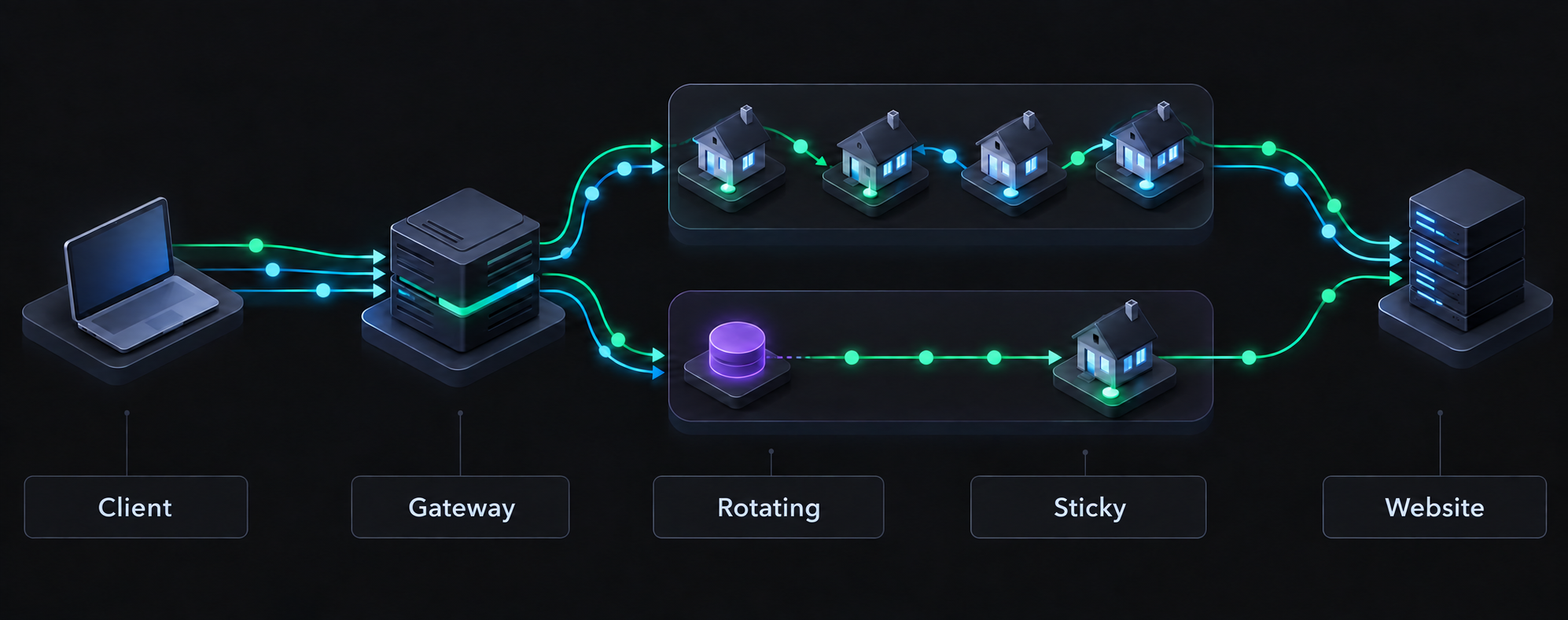
Both modes can use the same basic connection path: your application connects to a provider gateway, and the gateway forwards traffic through an available exit IP. What changes is the rule used to select and retain that exit.
Feature | Rotating proxies | Sticky proxies |
Exit IP behavior | Changes according to the provider's rotation rule | Remains assigned to one session for a limited time |
Best suited to | Independent requests | Related, sequential requests |
Session state | Usually not required | Must remain consistent across steps |
Common examples | Localized SERP checks, public price snapshots, catalog research | Authorized login tests, forms, carts, checkout QA |
Session ID | Usually unnecessary | Used to identify and preserve the session |
Duration | One request, connection, or configured interval | Until TTL expires or the exit becomes unavailable |
Early IP change | Expected as part of rotation | Possible if the underlying device disconnects |
Equivalent to a static IP | No | No |
The choice should be made per workflow, not necessarily per project. One system may use rotating sessions for broad monitoring and sticky sessions for the smaller number of checks that require continuity.
What Is a Rotating Proxy?
A rotating proxy is a proxy service that assigns different exit IP addresses from a pool according to a rotation policy. The user normally connects to one gateway hostname and keeps the same account credentials while the provider manages exit selection behind that gateway.
The word rotating describes IP behavior, not where the IP comes from. A rotating service may use residential, mobile, datacenter, or other address pools. In a rotating residential service, each selected exit belongs to an available residential connection.
How Does Proxy Rotation Work?
A rotating request generally follows this sequence:
Your browser, application, or data-collection tool connects to the proxy gateway.
The gateway validates your credentials and targeting settings.
It selects an available exit IP from the matching pool.
The exit sends the request to the destination website.
For the next request or connection, the gateway applies the rotation rule again.
Rotation can occur:
with every request;
with every new proxy connection;
after a time interval;
after a defined number of requests;
when the user deliberately changes a session parameter.
These triggers are not interchangeable. For example, an HTTP client may reuse an existing connection through keep-alive. If a provider rotates per connection rather than per HTTP request, several requests may continue through the same exit until that connection closes. Always check what the provider means by “per-request rotation.”
When Should You Use Rotating Proxies?
Rotating proxies are most suitable when each request can succeed independently. Typical authorized uses include:
checking public search results from several supported locations;
comparing public product prices and availability;
monitoring localized landing pages or advertisements;
collecting public catalog data at a reasonable request rate;
testing whether a public page is reachable from different networks;
distributing separate research requests across an available pool.
Consider a price-monitoring task that records the price of one SKU in ten countries. Each observation can be stored with its URL, country, currency, timestamp, and exit location. The result from one country does not need to share a login or server-side state with the next. Rotation is therefore a natural fit.
Benefits and Limitations of Rotating IPs
Rotation distributes independent requests across multiple exits and reduces dependence on the availability or reputation of one address. It also lets one gateway provide access to a changing pool without forcing the user to manage long proxy lists.
However, frequent IP changes can disrupt workflows that expect one continuous visitor. A website may associate a cookie, form token, cart, or authenticated session with the IP that created it. If the next step arrives from another address, the site may request verification, reset the session, or reject the action.
Rotation also does not erase other identifiers. Cookies, account history, headers, browser characteristics, TLS behavior, and request patterns remain visible to the destination. Changing only the IP does not make an activity anonymous, compliant, or guaranteed to succeed.
What Is a Sticky Proxy?
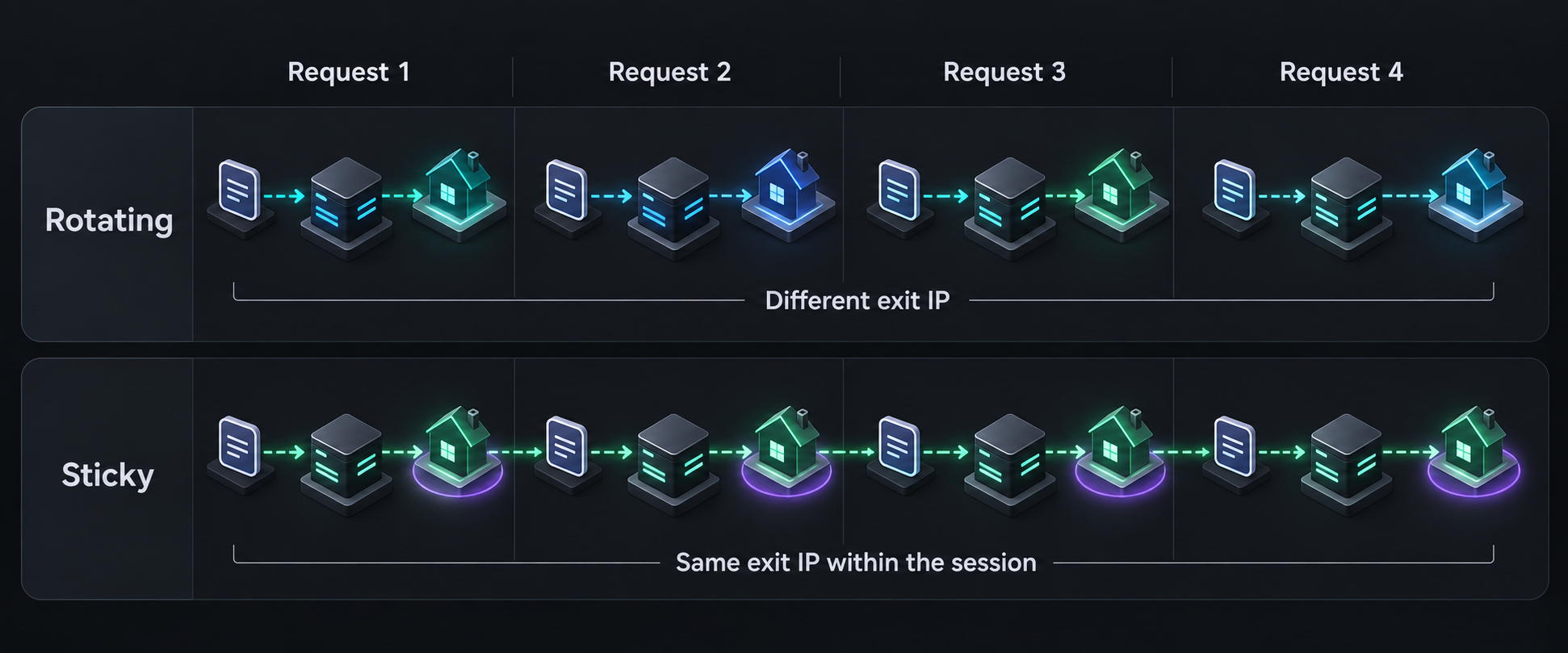
A sticky proxy retains the same exit IP for a defined session instead of intentionally selecting another exit for every independent request. This behavior is also called a sticky session, session persistence, or IP persistence.
Sticky proxies are useful when several requests form one ordered process. The destination sees the same exit IP while the user moves from the first step to the last, provided that the session has not expired and the underlying exit remains online.
How Does a Sticky Session Work?
The provider gateway must recognize which requests belong together. It normally does this through a session ID included in the username, password, port, or generated connection string.
When the first request arrives, the gateway maps that session ID to an available exit IP. Reusing the same identifier asks the gateway to keep routing later requests through the same exit. Using another identifier creates a separate logical session and may assign another address.
A session ID does not create a permanent reservation. It is a routing label whose mapping remains valid only within the provider's supported conditions.
What Is Session TTL?
TTL stands for time to live. In proxy session management, it is the configured or maximum period for which the gateway can keep a session-to-exit mapping active.
For example, a 15-minute TTL means the service will attempt to retain the same exit for up to 15 minutes. Once the TTL expires, another request may receive a different address even if it uses the same credentials.
The session window should be long enough to complete the workflow, with a reasonable margin. Making every session as long as possible is not automatically better. An extended window concentrates additional demands on a single exit and prolongs the workflow's reliance on that device.
Why Can a Sticky IP Change Before the TTL Expires?
Residential proxy exits are real devices using independently operated internet connections. A laptop can shut down, a router can restart, a phone can change networks, or the device owner can close the participating application. If the exit goes offline, the provider cannot continue routing traffic through that IP.
The gateway may then return an error or assign another available exit, depending on how the network is designed. For this reason, sticky-session TTL should be treated as a target or upper limit—not an unconditional uptime guarantee.
Reliable workflows should be restartable. If continuity breaks during an authorized multi-step test, begin a new session with a fresh exit and a clean cookie state instead of pretending that the new IP belongs to the old visit.
When Should You Use Sticky Proxies?
Choose a sticky session when later requests depend on earlier ones. Examples include:
testing authentication on a system you own or are authorized to assess;
verifying a multi-page registration or contact form;
testing a shopping cart and checkout flow;
checking language, currency, tax, and delivery behavior across one user journey;
inspecting paginated results when the website stores the search state server-side;
reproducing a location-specific issue that requires several consecutive steps.
For example, an e-commerce QA test may open a localized storefront, add a product to the cart, select a delivery region, and inspect the final total. A rotating IP could make the visitor appear to change networks midway through the journey. A sticky session keeps the network location consistent while the test is completed.
Sticky Proxy vs Static Proxy: Are They the Same?
No. A sticky proxy provides temporary IP continuity, while a static proxy is intended to retain the same address for a much longer period.
Feature | Sticky residential session | Static proxy |
IP duration | Limited by TTL and device availability | Long-term, according to the service agreement |
Underlying exit | Often a real device that may disconnect | Usually stable provider-managed infrastructure or a dedicated assignment |
Early change | Possible | Less common, except during outages or reassignment |
Best use | Short multi-step workflows | IP allowlisting and long-lived identity requirements |
If a partner requires one allowlisted IP or an application must use the same address for days without interruption, a dynamic residential sticky session is usually the wrong product. “Sticky” should never be interpreted as “permanent.”
How to Choose Between Rotating and Sticky Proxies
Start with one question: Can the next request complete successfully if it comes from another IP address?
If yes, rotating mode is usually the simpler choice.
If no, use a sticky session that comfortably covers the full workflow.
If the IP must remain unchanged for hours, days, or an allowlist, consider a truly static option rather than a sticky residential session.
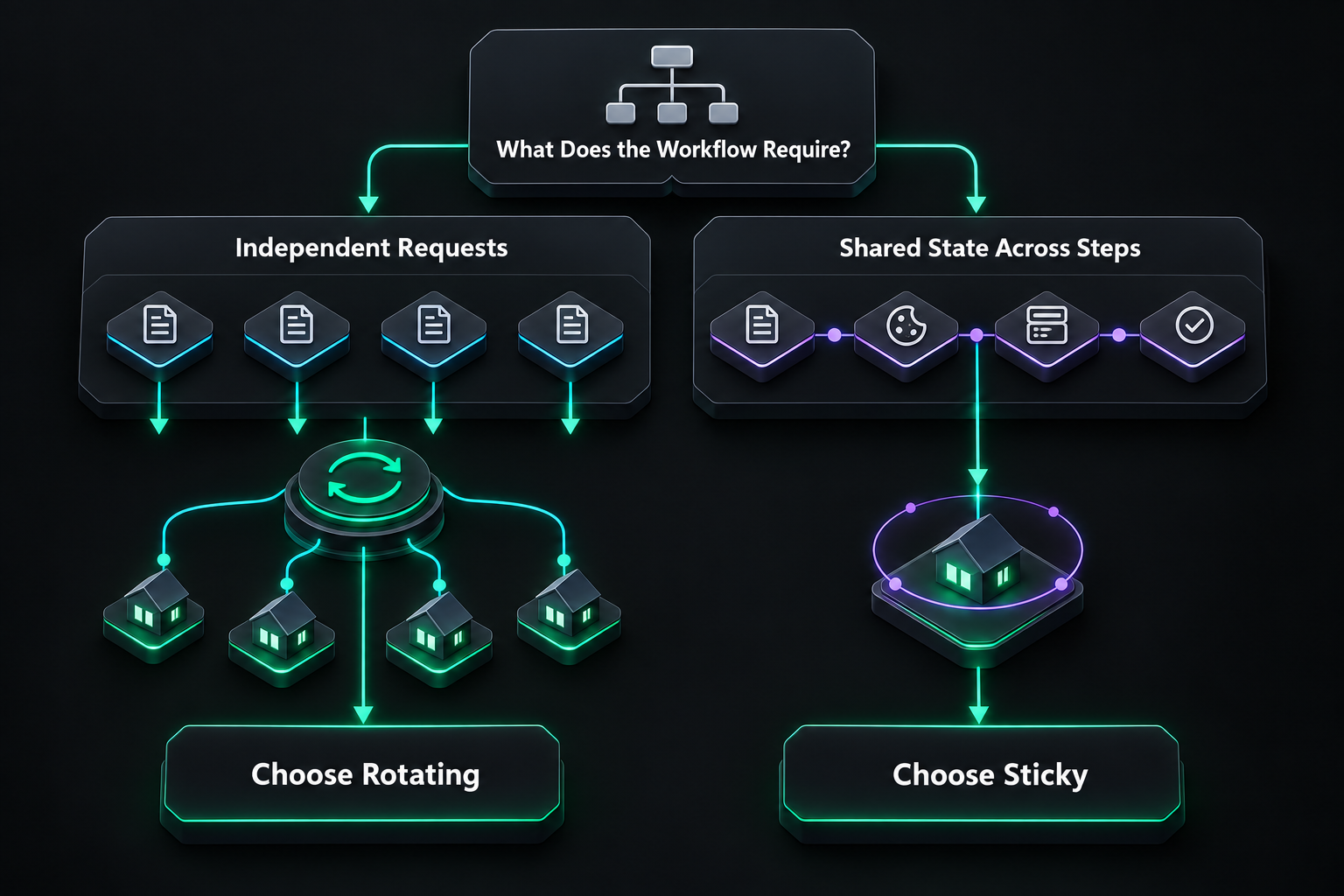
The following examples show how this rule applies:
Workflow | Recommended mode | Why |
Localized search-result check | Rotating | Each observation can stand alone |
Public price monitoring | Rotating | Every product snapshot can be recorded independently |
Regional ad or landing-page verification | Rotating for separate checks | Each country or placement can use a separate exit |
Multi-step QA test | Sticky | All steps should appear to belong to one visit |
Checkout or form validation | Sticky | Cookies, tokens, and state must survive between steps |
Full localized user-journey test | Sticky | Location and network identity should remain consistent |
Long-term IP allowlisting | Static, not sticky | A temporary peer-based session cannot guarantee permanence |
A Practical Selection Checklist
Before selecting a session mode, confirm:
State: Does the workflow use a login, cookie, cart, cursor, or form token across requests?
Order: Can URLs be requested independently, or must actions occur in sequence?
Duration: How long does one complete workflow normally take?
Restartability: In the event that a residential device disconnects, can the procedure be safely restarted?
Rotation unit: Does the provider rotate per request, connection, interval, or session change?
Location: Must the exit remain in the same country, region, or city throughout the flow?
Compliance: Are you authorized to perform the task, and are you respecting applicable law, website rules, privacy obligations, and reasonable request rates?
How Rotating and Sticky Sessions Work at X2Proxy
X2Proxy provides dynamic residential proxy access with two session modes:
Rotating mode selects another available exit IP for each request.
Sticky mode attempts to retain one residential IP for the chosen session duration.
Both residential pools are dynamic. Neither pool gives the customer permanent ownership of a household IP, and even a long sticky session can end early if the real device behind the exit disconnects.
Why Does X2Proxy Offer Two Residential Pools?
The two pools group residential devices by observed connection behavior so users can match the network to the task instead of treating every exit as equally stable.
One pool is designed for workflows that benefit from greater session continuity. It supports configurable sticky sessions from one minute up to five days, with a forced IP change after the maximum five-day window. Device availability can still end a session earlier.
The other pool contains devices that may connect and disconnect more frequently. It is better suited to rotation and shorter workflows where retaining one exit for a long period is not essential.
For localized search checks or public price snapshots, choose rotating mode and prioritize pool availability. For a multi-step QA flow, choose sticky mode, select the continuity-oriented pool, and set the shortest session length that comfortably covers the test.
The pool, session mode, and TTL solve different parts of the problem:
the pool determines the group of eligible exit devices;
the mode determines whether the gateway rotates or retains an exit;
the session ID identifies related requests;
the TTL limits how long that mapping should remain active.
Common Mistakes to Avoid
Assuming Every Rotating Proxy Changes IP per HTTP Request
Some providers rotate on a new connection or timer. Connection reuse can therefore preserve an IP longer than expected. Verify the rotation rule and test the observed exit behavior before running a larger workflow.
Treating Sticky as Static
A long TTL does not turn a peer-based residential connection into a dedicated static IP. Design for the possibility that the device will disconnect.
Keeping Old Cookies After an IP Change
If a sticky session fails during a stateful workflow, continuing with the old cookies from a new IP can create an inconsistent visit. Restart the logical flow and its client state together.
Rotating More Often Than the Task Requires
More rotation is not automatically better. Changing addresses during a continuous user journey can reduce reliability rather than improve it.
Ignoring Website Rules and Request Rates
A proxy changes the route used by a request; it does not provide permission to access restricted information or overwhelm a website. Collect only data you are authorized to use, minimize traffic, and follow applicable requirements.
Let’s Sum Up
The difference between rotating and sticky proxies is not simply “changing” versus “unchanging.” It is a decision about how requests are grouped.
Use rotating proxies when each request is an independent unit of work. Use sticky proxies when several authorized actions must remain part of one continuous session. Then choose a realistic TTL, account for residential device availability, and keep IP behavior aligned with cookies and application state.
X2Proxy supports both rotating requests and time-limited sticky sessions across two dynamic residential pools. Select the pool and session settings according to the workflow, test with a small traffic volume, and scale only after confirming that the observed behavior matches the task.
FAQ About Rotating and Sticky Proxies
What are the two types of proxies?
In the context of session behavior, the two common options are rotating and sticky proxies. Rotating proxies change exit IPs according to a rule, while sticky proxies retain one IP for a limited session. More broadly, proxies can also be classified by direction—forward or reverse—or by IP source, such as residential, mobile, datacenter, and ISP proxies.
Is it better to have a rotating IP address?
A rotating IP is better for independent requests such as localized search checks, public price monitoring, or broad market research. It is not better for every task. A sticky or static IP is more suitable when a login, cart, form, allowlist, or multi-step workflow depends on network continuity.
What does rotating proxies mean?
Rotating proxies means that a proxy gateway assigns different exit IP addresses from a pool according to a defined policy. Rotation may happen with every request, every new connection, after a time interval, or when the session parameters change.
What is a rotating proxies service?
A rotating proxy service gives users one or more gateway endpoints while automatically managing a pool of exit IPs behind them. The service authenticates the user, applies location and pool settings, selects an available exit, and changes that exit according to its rotation rules.